
Every Truckload Full. Every Window Met.
Big orders, one or two drops, and a trailer that should leave full. One AI-driven workflow combines orders heading the same way, fills each trailer by space or weight, and checks every delivery window and the driver's hours, so planners handle the exceptions instead of the combinations.
- 1Full by space or weight. Trailers fill to the pallet limit or the weight limit, whichever binds first.
- 2Every window and hour checked. Each drop is timed against its window and the driver's hours before anyone is dispatched.
- 3Exceptions flagged early. Orders that cannot go as entered are flagged, with a one-click way to resolve each.
01The problem
From matching big orders by hand to loads built before the shift
Combining orders by hand
- A planner pairs big orders from memory and a spreadsheet
- Trailers leave at 65% because the right pair was missed
- Heavy freight hits the weight limit before the pallet limit, unnoticed
- Exceptions surface when a driver calls
Truckloads built automatically
- Orders heading the same way are combined within your limits
- Space and weight are checked together on every load
- Windows and driver hours are checked on every drop
- The planner sees only the few that need a decision
02The workflow
From the first order to a released load
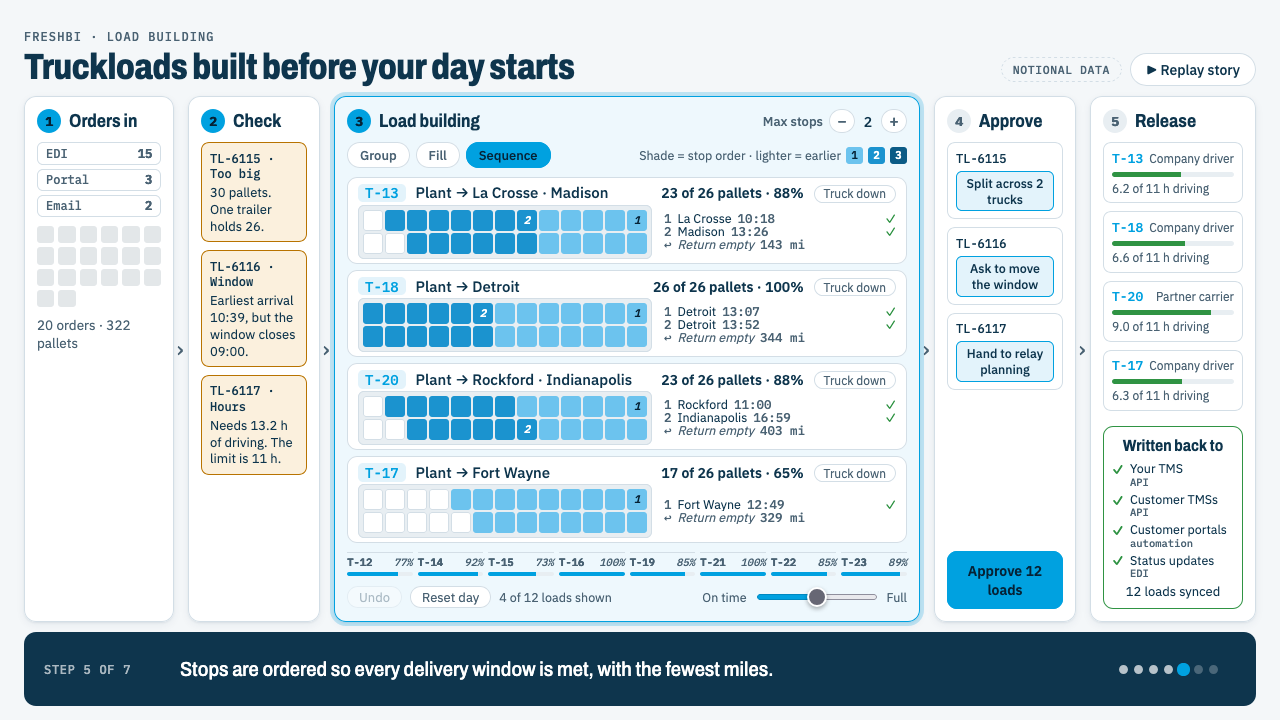
Five steps, one record. The heaviest work happens in the middle, where large orders become full trailers.
- Orders in One clean list
- Check Flags what cannot go as entered
- Load building Combine, fill and sequence
- Approve You decide the exceptions
- Release Drivers, your TMS and customer systems
03See it live
Watch a day of truckloads, then change the drops
The workflow plays on its own. Then change the maximum drops per trailer. In this notional day, sending every order alone needs 17 trucks at 62% full on average. Allowing two drops needs 12 trucks at 87%.
Notional orders, lanes, drivers and distances. The planner uses plain arithmetic (an insertion heuristic and exact stop ordering), not a language model, and it does not guarantee the best possible plan. A trailer holds 26 pallets or 44,000 lb, and a load that hits the weight limit first is marked 'by weight'. Driver hours shown are driving hours against an 11-hour limit. No load is dispatched and nothing is written to a TMS.
04Your rules
It plans inside the limits you already run
Rules are settings, not custom code, and a planner can change them and watch the plan re-solve.
-
Pallets and weight
Each trailer fills to its pallet limit or its weight limit, whichever it reaches first.
-
One drop or two
Set the maximum drops per trailer. One drop is a pure point-to-point truckload.
-
Delivery windows
Each drop is timed against its window, with tight and late drops called out.
-
Driver hours
Driving hours are checked against the limit, and long hauls are handed to relay planning.
-
Customer rules
Deliver-before times and ride-alone requests are respected on every load.
-
On time or full
One dial trades shipping on time against filling the trailer.
Frequently asked questions
What is truckload building?
How is this different from multi-stop load building?
How does it decide whether space or weight limits a load?
Does it replace our transport management system?
What happens to orders that cannot be loaded as entered?
Can planners override the plan?
What do we need to get started?
Ready to see your truckloads built before the day starts?
Book a free consultation and see how your own orders would load.