
Ship Loads That Keep Your Warehouse in Range.
Rail arrives tomorrow, and your lanes are already full. One AI-driven workflow builds the day's loads and watches every warehouse lane, so shipments are timed to keep the warehouse from getting too full or too empty.
- 1Every lane in range. Each lane is checked now, after the day's shipments leave, and after the next rail delivery arrives.
- 2Flexible orders move, not guesses. A lane that would overfill pulls forward orders customers will take early. A lane running low holds flexible orders a day.
- 3Planners stay in control. Every moved order is shown and tagged on its truck, and any change can be undone.
01The problem
From overflow surprises to a planned week
Loads and the warehouse planned apart
- Shipments are planned for trucks and windows only
- Rail arrives and the lanes are already full
- Overflow means extra handling, overtime or paid storage elsewhere
- One lane sits jammed while another runs short
Loads and the warehouse planned together
- Every lane has a visible capacity
- Shipments are timed against the next rail delivery
- Flexible orders ship early or wait a day
- The planner approves the few exceptions
02The workflow
From the first order to a balanced warehouse
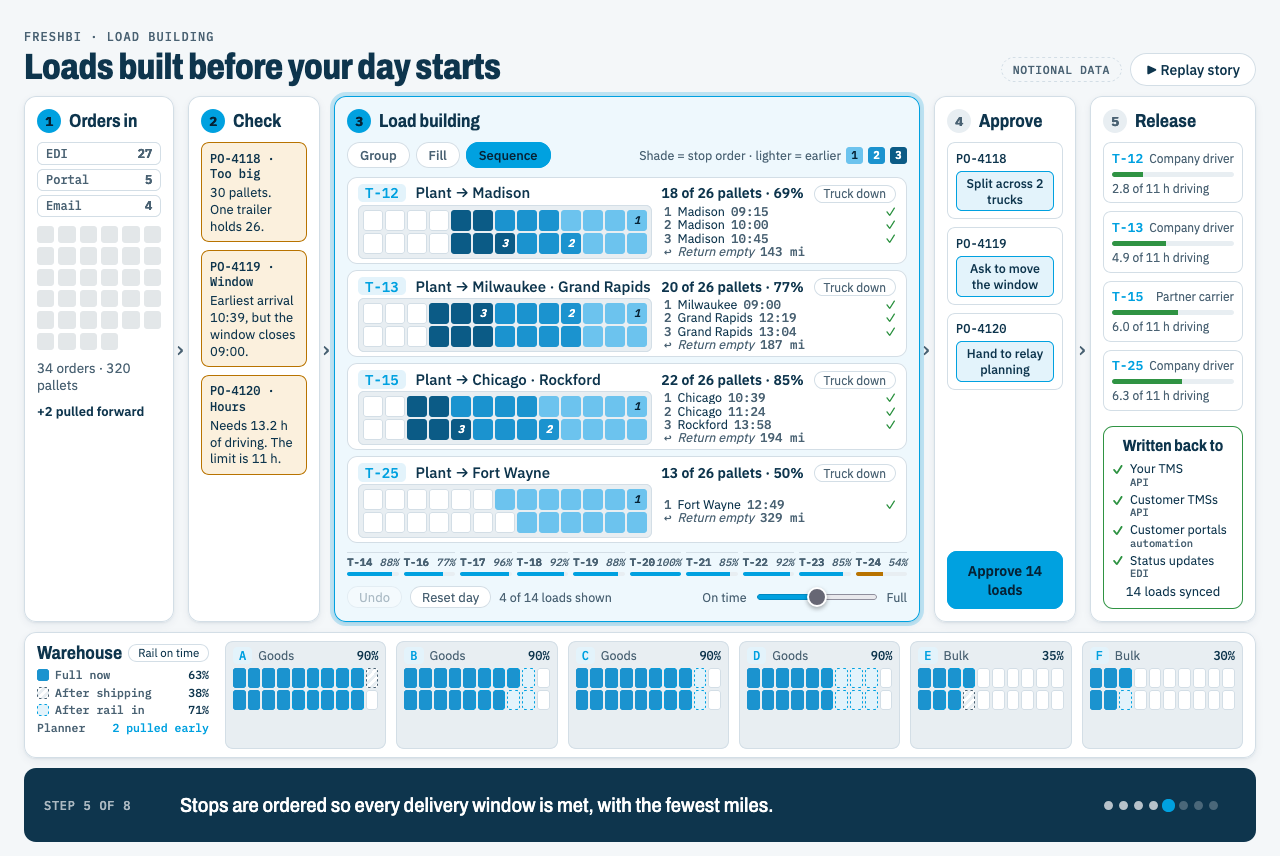
Five steps, one record. Load building builds the day's loads, then the warehouse check keeps every lane in range.
- Orders in One clean list
- Check Flags what cannot go as entered
- Load building Group, fill and sequence
- Warehouse check Lanes now, after shipping, after rail
- Approve and release Drivers, your TMS and customer systems
03See it live
Watch a day of loads, then change the rail
The workflow plays on its own. Watch the goods lanes reach 95% after tomorrow's rail, then the planner pull orders forward. Click Rail on time to see the plan if the rail is late and the bulk lanes would run low.
Notional orders, lanes, stock, rail arrivals, drivers and distances. The planner uses plain arithmetic (an insertion heuristic and exact stop ordering), not a language model, and it does not guarantee the best possible plan. No load is dispatched and nothing is written to a TMS, WMS or customer system.
04The rules
How the planner keeps lanes in range
Plain rules you can set, not a black box.
-
Too full
If a lane would go above 90% after the rail delivery, the planner pulls forward orders the customer will take early.
-
Too empty
If a lane would drop to 20% or below, it holds back orders the customer will take a day late.
-
Rail timing
Rail arrivals are part of the plan. Switch to a late delivery and watch the plan change.
-
Loads still follow the rules
Pallet and weight limits, delivery windows, stop limits and driver hours are checked on every load.
-
Every change is shown
Moved orders are highlighted and tagged on the truck that took them.
-
Undo anything
Undo restores the earlier plan, warehouse lanes included.
Frequently asked questions
What is warehouse throughput?
How does it decide which orders to move?
Does it replace our warehouse management system?
How does it know about rail deliveries?
Can planners override it?
Is the demo real data?
What do we need to get started?
Ready to see your lanes stay in range?
Book a free consultation and see how your own orders and warehouse would plan together.